Showing posts with label Temporary File. Show all posts

Saturday, May 29, 2010

How can I increase the speed of computer?

Do you know that, you can increase the speed of computer by following some ways? Today I am writing 3 ways to increase the speed of the computer. Hopes it is useful for you.
Suppose the house you live in is overloaded with temporary materials. At this moment you can not work for those temporary materials. But if you regularly remove the temporary materials from your house then it is easy to work on the home. As like this if the computer is overloaded with temporary files then it is difficult to work for it. For that you can not find high speed in any work with computer. But if you regularly remove the temporary files from the computer then you can work easily. You can release the importance of removing temporary files from the computer by seeing a simple example. I use the Pentium Celeron D computer and it’s has 512+256 MB RAM. And one of my friend use Pentium Core 2 Due Processor and the RAM size of his computer is 1 GB. But my computer is faster then his computer. Because I take care of my computer properly.  Hope all can understand about the importance of take care of the computer. Now I am saying about the way of take care of the computer.

1st way: - Defrag the computer regularly


It is proved that if you defrag the computer regularly then the speed of the computer must be increase. So always defrag the computer by using Disk Defragmenter. How can I defrag my computer? Yes! For defrag the computer first of all go to  Start—Program files—Accessories—System Tools--Disk Defragmenter then the software of Disk Defragmenter will be open. Now select a drive for defrag it and click on the button of Defragement for start disk defragementing.
Disk Defragement

2nd way: - Check the computer regularly


You also must check you computer regularly. Without it you can not get best benefit. You can check the computer by using many ways but here I am saying only one way of disk checking. First of all go to My Computer and right click on any drive for check it. And select Properties. Go to tools tab. Now click on the button of Check now. For start disk checking.
check disk

3rd way:- Remove the temporary files regularly


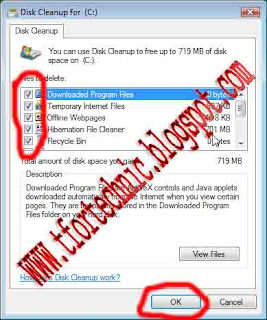
It is the last way of make the computer faster. By removing the temporary files regularly you can increase the speed of your computer. For remove temporary files from the computer go to, Start—Program files—Accessories—System Tools—Disk Cleanup. Now select a drive for clean the temporary files from this drive. After that a new dialogue box will be opened. Select every check box and click on Ok for delete the temporary files from the computer.
disk cleanup

By following it you can increase the speed of your computer. Thank you for see it. And always be connected with T for Technology.

Monday, May 24, 2010

How can I delete the valueless files?

There are some files which are not used for any work but those files stoke a lot of value able memory. And sometime those files are causes for computer problems. So we all want to delete all of those valueless files form the computer. For learn about the way of deleting those files read out this post.
Those files stoke a lot of memory so that everyone wanted to see those files. And it is also important to show those files for learn about those valueless files. But it is a wonder of joy that it is hard to show those valueless files.

How can I show the valueless files?

There are many kind of valueless files but here I am only talking about one kind of valueless files. And this kind of valueless files stoked a lot of computer memory. Sometime those files stoke 1GB or more memory. For show this kind of valueless files first of all open the program of Folder Option. For open it goes to Start—Control Panel and double click on Folder Option for run it.
After run it clicks on the tab of View. Here you can show some option button and some check box. Find out the option button of “Show hidden files and folder”. Now select it. And again find out the check box of “Hidden Protected Operating System File (Recommend)” now click on this check box for select it. After doing those click on the command button of Ok. Now open any drive [Example:- Local Disk (C:)]. After open any drive you find some new folder. And some of those folders are those kinds of files. The files forms the folder of “System Restore” are stoke maximum memory of the hard disk.
Now the question is how can I delete that kind of files form the computer? Yes! It is the main fact. You can delete those file by following normal method but it is not good way to delete those files. Because there are some files which is not possible to delete by following normal way. There are many software for delete those undeletable files. You can use that software for does it. I will say more about that software in another post. Now I am saying about the right way to delete those delete able. There is a program for delete those files. And the name of this program is Disk Cleanup. It is a wonder of joy that it is no need to install. Because you can find it with the operating system of windows. Now the question is how can I use the software of Disk Cleanup? Now I am saying about it.

The way of deleting valueless files form the computer

First of all run the program of Disk Cleanup. You can run it by following many ways. I am saying about only one. First of all go to My Computer and right click on a drive for delete its valueless files, select Properties. And after that the dialogue box of properties will be run. Now click on the command button of Disk Cleanup. After a few moments the program of disk cleanup will be run. Here you can show a list. You can find there one list item of “System Restore Obsolete Data Stories”. Click on this item for select the check box of this item. Now click on Ok. By doing those you can delete those valueless files.
If you delete those files then you can enjoy many benefited. If you delete those files then your computer will be faster, you can save a lot of computer memory and so on.
I hope all can understand about it. If you fail to understand about anything then please inform me. I will try my most for solve you problem. Thank you for see it.

Sunday, February 28, 2010

How can I delete temporary files form the computer?#2


how can i delete temporary files form computer

Hi all, what’s up. Hope all is well. In my previous post I am talking about how to delete temporary files manually. But today I want to give you the knowledge of deleting those files automatically. I hope everyone can understand about this. First of all you must learn about temporary file. In my previous post I am talking about it. If you do not sow it then click here at now. There is a tool in the computer who can automatically find the temporary files and who can delete those files easily without any difficulties. The name of the tools is “Disk Cleanup”. You can easily delete the temporary files form computer by using it. For run it first of all open “My Computer”, right click on any drive for remove the temporary files of it. Now click on “Properties” after that you can find a dialogue box. Click on “Disk Cleanup” after that you can find a new dialogue box. There are many option buttons on the dialogue box. Select all of those options. In the right side of those buttons you can see the size of those temporary files. After selecting all of those files click on “OK” button.

how can i delete the temporary files form the computer

By doing this you can remove the temporary files of your selected drive. By following this you can delete all of the temporary files form you computer. But remember that if you follow this then all of the files form “Recycle Bin” also be deleted. Because those files whose are also be identified as temporary files. I hope you can understand what I want to say. Thanks for see it. Now please give your owner able comment.

Saturday, February 27, 2010

How can I delete temporary files form the computer?#1


how to remove temporary files

Hi all. How are you? Hope all is well. We know that there are so many temporary files in our computer. Those files are not useful. Those are also causes for some problems. It takes a much memory in our computer. You can understand about temporary files by showing an example. Example: - you are reading a newspaper. There are so many news in a news paper. But all of those are not useful for you. You find out the some news which is important for you. And you fall down other news. You fall down that news because those are not useful for you. Those news are sometime disturbs you in many ways. Temporary files are that news in your computer. But it is so difficult to find out all of those files manually. But there are some ways to find out all of those files. You can find out all of those files by using some software. You can also remove those files after find out those. Today I am talking about a way to find out temporary files. It is no need to use any software to find out those files.

how can i remove temporary files form computer

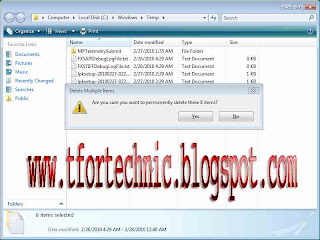
For find out those files first of all click on Start Button. Now Click on Run. And write down “Temp”, click on Ok. Then you can find some temporary files. Now delete all of those files. It is a command to find out temporary files. There is another command to find out temporary files. First of all open Run. Write down “%TEMP%” and click on OK now you can find all the temporary files which is harmful for your computer. Now select all and delete all. By doing those you can remove the temporary files form computer. You can delete the temporary files by using a tool. This is no need to install. I will talk about this tool in by next post. Keep your eyes on my blog for see it. Thank you for see this post now please give your owner able comment.