Showing posts with label System Restore. Show all posts

Friday, February 26, 2010

Get my lost files and undo the changes of my computer #4

how to undo the system restore

Hi, last three days you are watching about what is system restore, how to turn on the restore sitting, how to run the system restore application, how to create a restore point and how to restore the computer. But today I am talking about how to undo the restore. Suppose after restoring the computer you can guess that it faces some problem and you can not get your losses files but also loss some files. Or you get some virus files with those files. At this moment what do you do? There is also a function in system restore to solve this problem. And this function is called undo the restore. You can go back your past when you did not restore your computer by using this function. For using it you must open the application first. Then you can see a new option button. And it is “Undo my last restoration”. At past you could not see it. It can be seen after restore the computer. Now select it and click on Next button. By doing this you can undo the restore of your computer and you can solve the problem. I hope you can understand what I want to say. For get much knowledge show my last three posts. By showing this you can understand more. Thank you for seeing it. Now please give your owner able comment.

Get my lost files and undo the changes of my computer #3


how to restore the computer

Hi all how are you. I hope all is well. Today it is the third part of System Restore. In my previous post I said about what is system restore, why it is used, how to run the application of system restore and how to create a restore point. Today I am trying to give you a description about restoring the computer. It is the main function of system restoring. And by doing this you can get your lost system files. I hope you can understand about system restore by reading all past post of system restore. System restore is called restoring the computer in past. First of all run the system restore program. For learn about how to run the system restore program show the previous posts. For show the previous post click here.

After run the System Restore Program select the option of “Restore my computer to an earlier

how to restore the computer

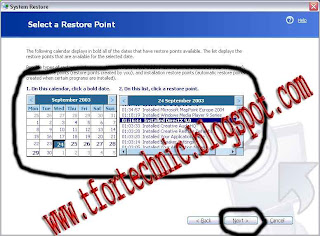
time”. Now click on “Next” button. After that you can find some restore points and the description of those points. Now select a system restore point. Selecting the system restore point is the main function. After select it clicks on “Next” button. After that your computer will restarted. And you system restoring is completed. After restart your computer you can get the lost system files and system changes. I think you can understand how to restore a computer. I am talking about how to undo the restore in my next post. Keep you eyes on this blog for see it. Thank you for see it. Please give you owner able comment.

Wednesday, February 24, 2010

Get my lost files and undo the changes of my computer #2


system restore

Hi all hope all is well. Today I am again talking about System Restore. If you don’t show my previous post then you can not understand much by reading this post. For read my previous post Click Here. In my previous post I am talking about what is system restore. Why you use it. It means in my previous post I want to introduce you with system restore. Today I am talking about the main program. It means which kind of work you can do by using system restore. The first of work system restore is creating a restore point. Second work is restoring the computer to an early time. Third work is undoing the restore. Today I am trying to give you the knowledge about creating a system restore point. I think you can understand this event by seeing an example. Suppose you are writing a text by using MS Word. After complete a part of the text you may save it. After that you again set for edit the text. But after sometime you think that after save it you don’t write down the right thing. For that you close the document and open the files which is saved at past by you. Creating a system restore is a same thing. Suppose you troubleshot your computer’s software. After troubleshooting it you think that this software is in a write place then you can create a restore point. For that in a future time you can go back this sitting. Suppose after creating the restore point you install some software which are the causes of your computer’s problem. Now you can go to the previous restore point. So it is an important event to create a restore point. Now I am talking how to create a system restore point. It is not a hard work. It is so easy to create a restore point. You can create a restore point by following this.

First of all open the System Restore application. I was talking about how to start System Restore

how to restore a system

in my previous post. After open it click on “Create a restore point”, click on “Next” now write down a description about this restore point. It helps you to understand about the restore point in future. Now click on “Create”. By doing this you can make a restore point. And you can use it in future. I will talking about how to restore the computer in my next post. Take your eyes on this blog for see the next post. Thank you for see it. Please give your owner able comment.

Tuesday, February 23, 2010

Get my lost system files and undo the changes of my computer.

System restore is a great application. you can get your lost change and files by using it
Hi all. How are you? I hope all is well. Sometimes you feel so unhappy, so angry, and uneasy when you delete any important file without any reason. Want understand about it? I think you can not understand what I want to say. Now I am explaining it clearly. There are many files in your computer. Some of those files are related with system. Without those files sometime computer can not work properly. It shows error. Suppose you are working in your computer for long time. There are many less important files in folder now you want to delete those files. For that you delete the folder but after deleting this system folder you face some problem. Now you can remember that there are some files which are related with system or software. And those files are must for running the software or operate the computer properly. Or suppose you want to change any sitting of the operating system. But you change another sitting and forget the main default sitting. Now what do u does? For solving this problem there is some System Restoring Software. Today I am talking about such kind of software. If you get software freely then are you bought this software by money? Today I am saying about such kind of software. You can freely get it. And it is not only free but also you can it without installing any software. It is installed atomically when you install any operating system. However now I am talking about this software. The name of the software is System Restore. Actually it is not software it is just an application. You can get your lost files and lost change by using this software. But if you want to use this software first of all you must turns on its function. Without turn on it function it can work.
system restore is a important application
You can not get a profit by using it if it is turn off for working. For turn on its function first of all Right Click on My Computer, click on Properties. Go to System Restore. Di select the sitting of turn off system restore. If you don’t find any right click on “Turn off System Restore of all drive” then it is no need to work for it.

Now I am talking about how to run system restore. For run System Restore first of all click on Start Button, go to Program Files-Accessories-System Tools and click on System Restore. Now you can find the main program. Actually today I want to introduce you with system restore. I will say details about System Restore by my next post. Thank you for see it. Please give your owner able comment.